Friday, January 18, 2019

Writeup on Intigriti CTF - A Failed Attempt

On 9th of January, 2019, Intigriti announced following CTF challenge
( https://twitter.com/intigriti/status/1082979668972748803 ). As I recently started trying out CTFs,
I thought to give it a try, although my CSSLP exam was almost close.

So where to start? As there was no other hints at that time, and there is an emoji pointing to the
attached image, I thought the clues or flag itself was inside the image, so I downloaded it to my
Kali VM.

Then it was time to analyze the downloaded image file.
 
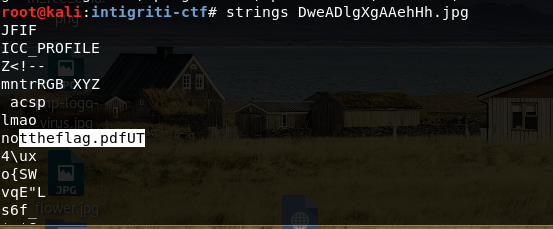
Using “strings” command on the image file showed some interesting texts like “lmao” and
“nottheflag.pdf”. So I thought maybe there was a pdf file embedded inside the image file (As I
remembered reading similar steganography techniques in twitter or somewhere before)
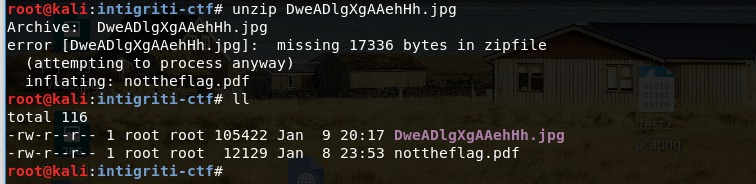
On the first attempt, I just renamed the file to .zip extension and used “unzip” command which
gave me the pdf file.
But then I found a better way to do that using “binwalk” command later thanks to further google
searches. This “binwalk” command shows what are the embedded files inside a file.
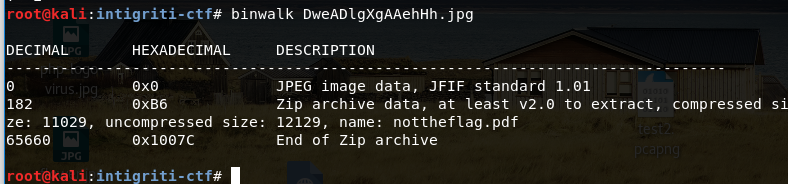

If you use “-e” option of “binwalk”, it even extracts those files to the current directory. But I was
still new to this tool, so I only found about it later. I just used “unzip” command on the jpg, and
voilà, now there was a file named “nottheflag.pdf” in my current directory.

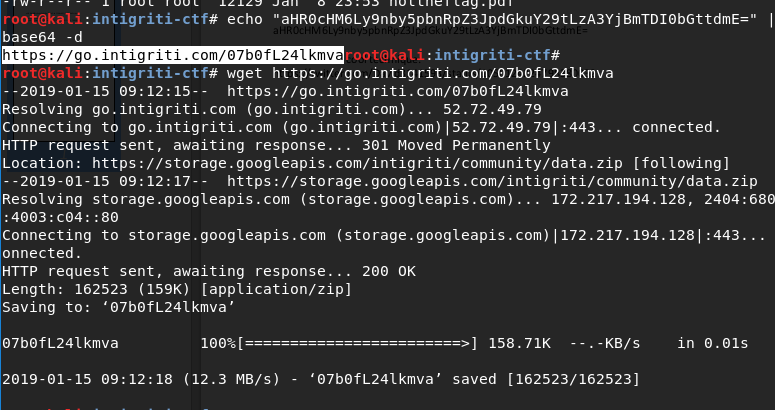
Opening the PDF file showed a base64 encoded string and a URL to a tweet.
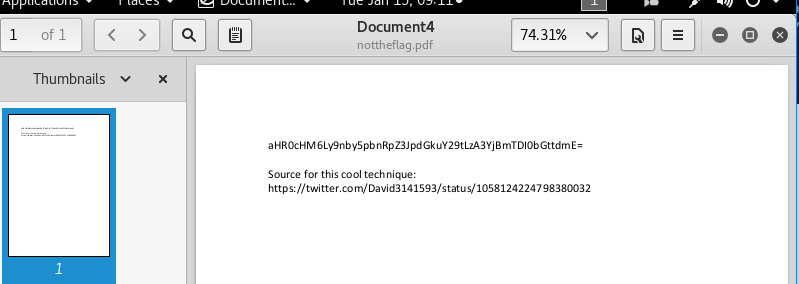

Decoding the base64 string:


Accessing the decoded URL (https://go.intigriti.com/07b0fL24lkmva) pointed to a zip file.

Ok, it is an encrypted file. Where is the password? Let's see what hints are posted by intigriti.

There is an emoji pointing up. I checked the original tweet again, and examined the cover image
of the current image, even found another twitter account named “WhereIsTheFlag”.
https://twitter.com/WhereIsTheFlag


Still I did not have a clue where was the password.

Again new hints were posted by intigriti pointing up.
Where is it?
Feeling same as @SYNTAXERRORBA
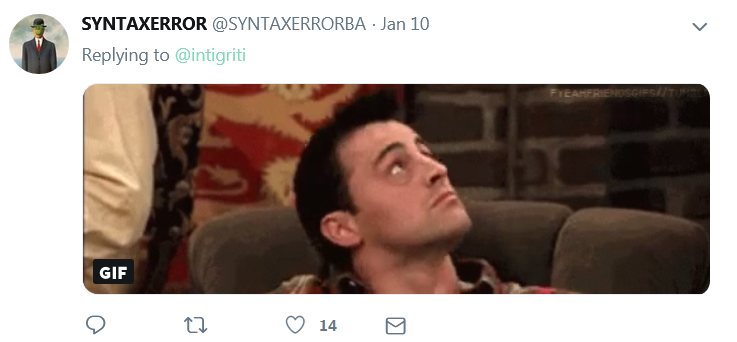
The ceiling? 😓

The sky? 😕

Ok, after sometime, I remembered I had to study for CSSLP exam. So gave up.
…….
But again later, Another hint.

I already looked cover image of intigriti twitter account. (But I forgot to check the cover image of
other twitter account “WhereIsTheFlag”, that was where they hid the password according to
another writeup). So no password for me.

Another hint is about a matrix. The MATRIX?

😕, maybe they are talking about a color table in JPG file?
Spent more time wasting about reading about JPG and using commands like xxd to analyze jpg
file. Then I remembered again I had to study for CSSLP and went back to studying.
The last hint.

I am not skilled enough on CTFs yet, but I can try.
Using unzip commands to see available data on the zip file:
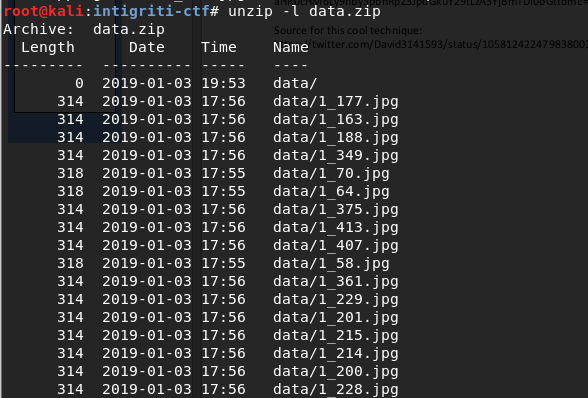



unzip -l command shows encrypted zip file contain 441 jpg image files with two different sizes
(314 and 317/318 bytes)
as the last hint says we do not need to decrypt the zip file, I thought image filenames and file
sizes should be sufficient to get the flag.

As one of the hint is about a matrix, it is possible the information from files should be arranged in
a matrix and because 441 is 21x21, this assumption seemed correct. Best known data
representation (at least for me) using a matrix is QR code. According to wikipedia article about
QR code, the version 1 of QR code is 21x21 which gives further credence to possible retrieval
of QR code using found data. If this assumption is correct, two image sizes may be used to
represent for black and white colors.
Therefore the next step was to convert the file sizes to 0/1 or black/white and then to arrange
those in 21x21 matrix ordered by file name.
First I generated a black png and a white png with size 10x10 pixels for generating the main
image, using imagemagick convert command.

Then I generated an imagemagick convert command which arranges above created black and
white images in rows and columns, while black representing image files greater than 314 bytes,
and white representing image files equals to 314 bytes in size.
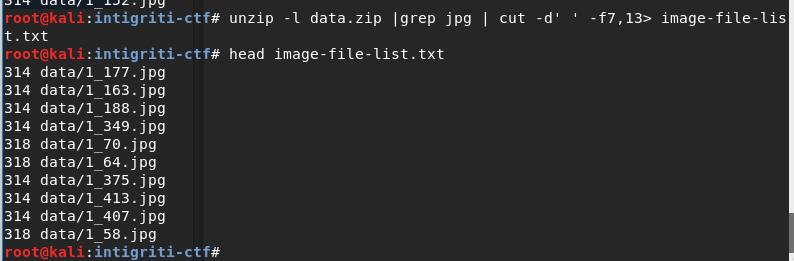


Then I copied the generated imagemagick command from qr2.txt and executed it in command
line (somehow using `cat qr2.txt` did not work, so had to copy paste using xclip command).
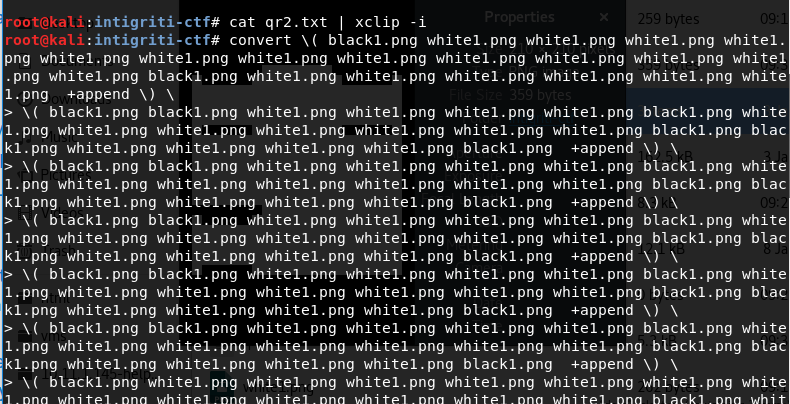
Now it is time to see the generated image. ⏳
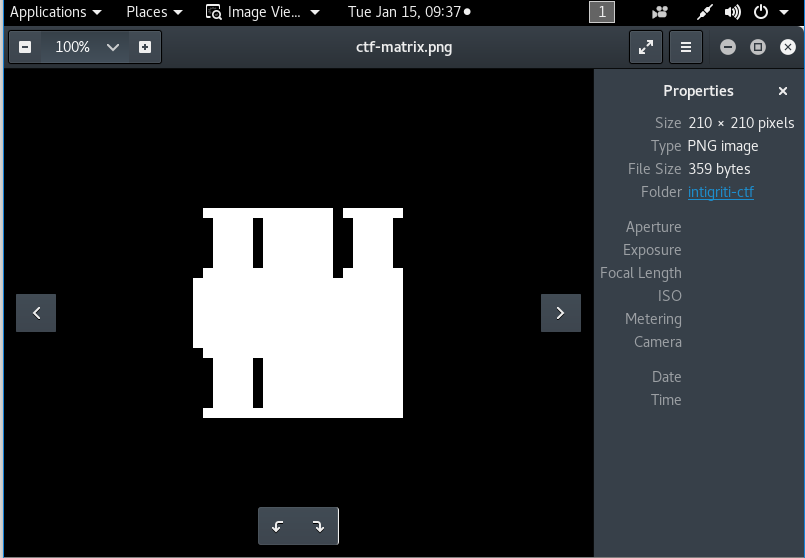
So I got a silhouette of a nice building. 😯 I don’t think that is the flag.

Then after sometime, as the last attempt, I thought maybe if I compared the encrypted file
content (retrieved through zipdetails command), I could find which files were similar (black or
white). But It did not work as I did not find any encrypted file with same data as any other file.
Then I gave up for the last time as I still had another high priority, CSSLP exam. So no flag for
me this time, but at least I passed (provisionally) CSSLP exam 😊.

You can find a writeup on a successful attempt to capture this flag by @DJBusyR
here https://busyr.com/writeups/intigriti_-_find_the_flag_earn_swag.pdf

Friday, November 9, 2018

My Experience on Preparing for PTE Academic Exam


After postponing for a long time, today (2018-11-09) I finally sat for the PTE Academic English exam. As I did not spend enough time to prepare and practice for the exam, I do not expect that I will get a good score 😅. I will have to wait 5 more business days to see the exam results. Until then, I decided to record some of the things which can be helpful to other future test takers.

Planning

As I was postponing the preparation for this exam many times (as there were lot of other interesting tech stuff to learn than 'boring' English 😃), I decided to just schedule the exam without any preparation 😟. I scheduled the exam about 3 weeks ago, so I only had around 2 weekends + 3 more weekdays to prepare for the exam.
PTE official website itself has lots of valuable resources for you to prepare for the exam (See https://pearsonpte.com/preparation/ ). This website even provides free practice questions which you can download to your computer (See “Offline practice test” in https://pearsonpte.com/preparation/resources/  page). I downloaded the PTE test takers hand book and other such documents available from the official website. This website also has good introductions (including short videos) about each question type. Then I created a separate folder for each question type to store the resources related to that question type. This helped me to easily focus on each question type individually. Then I created a plan to prepare for the exam within the short time period available before the exam.
For PTE, there are two main areas you must focus.
  •  English enabling skills (Grammar, Vocabulary, Pronunciation, etc)
  • How to answer each question type

Preparation

Improving English Enabling Skills 

In addition to prepare for answering the questions, you must improve your core English enabling skills such as grammar, vocabulary (PTE exam focuses on academic related vocabulary), and pronunciation.
For grammar, I followed an online video course from Udemy website (by Anthony Kelleher). For vocabulary, I followed a pdf which contained "the top 400 words from PTE vocabulary". But I think my academic related vocabulary was already good due to the day-to-day work I do for my job and due to lot of reading I do, so you may have to spend more time to study more words targeted in PTE vocabulary.
For the pronunciation, I learned two techniques. First one is, to google whenever I find a word which I didn't know how to pronounce, and then click the "speaker"🔉 button in the Google 🔎 result page to listen how to pronounce it. The second technique was to use the Voice Recorder software available in Windows OS to record my own voice saying the specific word and then to listen to the recorded voice to compare it with actual expected pronunciation to identify whether I have to improve the pronunciation. You will be surprised to learn that although you thought you pronounce the word correctly in your mind, you pronounced it wrongly in reality (even some simple words). This second technique is very useful as it gives you immediate feedback to correct your pronunciation.

Preparing for Question Types

What I did first, was to re-order the question types by the complexity and difficulty, from most complex/difficult to least complex/easy. Then I could prioritize spending time on preparing and practicing the question types in the top of the list, and then go down the list. I identified that I actually did not have to prepare for some question types in the list, as those are very basic questions. I practiced answering those questions only during the mock tests.
"Write an essay" question type was on the top of my prioritized list, and the second one was "Describe an image" question type. Those were followed by "Re-tell a lecture", "Summarize Spoken Text", and "Summarize Written Text". From all of these prioritized question types, I struggled with "describe an image" question type the most.

Methods/Structures

To answer a question from each of these complex question types in PTE exam, it is not enough to have proper English enabling skills such as grammar, vocabulary, and pronunciation. It is essential to have a method, or a structure prepared beforehand for properly and quickly answer these questions within the given short time period. Fortunately, there are videos in YouTube that explain about these methods/structures by an excellent English PTE guru named Jay, from http://www.e2language.com website. I will list down links to these videos at the end of this post.

Practice

For practicing, I found some sample questions from different sources such as from Jay’s videos, from PTE website, and other online resources. As I did not have enough time left, I did not practice enough questions to make me feel fully confident. For example, I wrote only 3-5 essays before the PTE exam.
I also bought 2 scored mock tests from Pearson website (https://www.ptepractice.com/). Doing these scored mock tests was very useful to get ready for the actual exam.
Things to note: Although I had more than enough time when I did the mock exams, it seemed I was not careful with time during the real test. Therefore, I was not able to answer 1-2 questions in the first section. Also, it was little bit distracting due to the noise of the other test takers during the first section. From my overall experience during the preparation and facing the PTE exam, the most difficult question type for me was "Describe an image" question type. All other question types were manageable. It was very interesting experience (as this is my first non-tech exam after more than 10 years), but I am not exactly sure what will be the score. Let's hope for the best 🙏. [UPDATE: I received my PTE score report on next day. Score was better than I expected 😊]

Links

·        Question Type: “Write an essay”
o   PTE Writing Write Essay SUPER STRUCTURE  Sentence by Sentence with Jay! - https://www.youtube.com/watch?v=z_-u0fHQetQ
o   How to write a good essay Paraphrasing the question - https://www.youtube.com/watch?v=o9aVjBHEEbU  
·        Question Type: “Describe an image”
o   PTE Speaking: Describe Image | SUPER METHOD! - https://www.youtube.com/watch?v=rveo3RFK3kk
o   PTE ACADEMIC DESCRIBE IMAGE with RESPONSES - ULTIMATE COLLECTION !! - https://www.youtube.com/watch?v=T9_PYMRyQCY
·        Question Type: “Re-tell a lecture”
o   PTE Speaking  Retell Lecture METHOD with Jay! - https://www.youtube.com/watch?v=U9iYnbHd5ys
·        Question Type: “Summarize Spoken Text”
o   PTE Listening: Summarize Spoken Text | METHOD with Jay!  - https://www.youtube.com/watch?v=cc86wI4v4rc
·        Question Type: “Summarize Written Text”
o   PTE Writing: Summarize Written Text | Learn the Proven Method! - https://www.youtube.com/watch?v=AdyRgrOEzx8

Tuesday, October 30, 2018

Kaizen Singapore CTF - My first CTF experience


Today (27 of Oct, 2018), I attended a CTF organized by Div0, Booz Allen Hamilton, and ICE71, based on Kaizen CTF platform of Booz Allen Hamilton. According to Booz Allen Hamilton, they had done similar events throughout the world using this platform. I got to know about this event through Div0's meetup page (https://www.meetup.com/div-zero/events/255394149/). Although I had heard about CTFs and was interested in participating CTFs for a quite some time, this was the first CTF I felt comfortable enough to attend. Main reasons were, it was a single player CTF and organizers had specially mentioned that this was a beginner friendly CTF which can be an ice breaker of CTFs. As I did not know any other colleagues who were interested and had security skills to form a CTF team, I was not able to attend CTFs which expect teams.

As I learned, there are two types of CTFs. One type is attacker-defender type CTFs, and the other type is jeopardy style CTFs. The CTF organized by Kaizen was a jeopardy style CTF.
The event started by hosting a lunch and networking session at around 1pm, and then after a quick introduction about rules and the platform, the CTF was started at around 3pm.
The time duration for the CTF was from 3pm to around 7pm. At 3pm, the Kaizen platform allowed us to access the CTF challenges. The CTF challenges were categorized under 'coding', 'reverse engineering', 'crypto', 'web', 'networking', and 'forensics'.

As we were instructed not to share the details of the CTF challenges, I will try to give information about the experience without leaking information about the challenges.
I started the first challenge in 'coding' category, although I understood what was the expected algorithm, due to lack of experience in developing expected kind of scripts, I did not continue to work on creating a script for this. I stopped it there and then started challenges in 'Web' category. From around 6-7 challenges in 'Web category, I completed 3. I also almost completed 2 more 'Web' challenges, but I was not able to continue those two at the last step. Then I moved to complete a challenge from each 'Forensics', 'Networking' categories, and 2 challenges from 'Crypto' category.

So I completed 7 challenges and almost completed around 3 more challenges. Although my score was not that high, I think it is a good score for a first time CTF. As I was afraid I would be stuck in rabbit holes, I moved away to other challenges when I felt I was stuck at one challenge for few minutes. I am not yet sure whether that is a good approach for CTFs, or whether I should try to complete high value single tasks taking more time. My strategy was trying to complete basic challenges of each category if I feel like I have the basic knowledge, then move to work on other advanced challenges in categories familiar to me, and to move to next one if I am stuck more than few minutes.

There were very valuable prizes prepared for the top 5 players in the leader board, including 2000 SGD worth training voucher for a security training such as OSCP/OSCE for the first place winner. The organizers had organized this event excellently and only complain I have is that room was too cold at the end. It would be great if there was hot coffee or tea there. Overall it was worthy learning experience and I would like to thank Div0, Booz Allen Hamilton, and ICE71 for their effort on organizing this event.

Thursday, April 20, 2017

Phishing with Unicode Domains

“Phishing with Unicode Domains” is an interesting phishing attack resurfaced by a security researcher named Xudong Zheng last week.
In this phishing attack, it is impossible to identify whether a site is fraudulent one by just checking the SSL certificate + the URL in the URL bar.

“Punycode makes it possible to register domains with foreign characters. It works by converting individual domain label to an alternative format using only ASCII characters. For example, the domain "xn--s7y.co" is equivalent to "短.co".
From a security perspective, Unicode domains can be problematic because many Unicode characters are difficult to distinguish from common ASCII characters. It is possible to register domains such as "xn--pple-43d.com", which is equivalent to "аpple.com". It may not be obvious at first glance, but "аpple.com" uses the Cyrillic "а" (U+0430) rather than the ASCII "a" (U+0041). This is known as a homograph attack.

Original article: https://www.xudongz.com/blog/2017/idn-phishing/
POC: https://www.xn--80ak6aa92e.com/
https://en.wikipedia.org/wiki/IDN_homograph_attack

Sunday, October 30, 2016

Oracle WebLogic Server - Part 2 - Node Manager and its interaction with WebLogic Server instances

In this post, I am going to describe node manager process and its interaction with WebLogic server instances. This post covers mostly theoretical parts, it does not includes instructions on  how to perform tasks related to node manager.

 In WebLogic Server environment, the Admin Server does not connect to the managed servers directly. A separate utility named "node manager" should be running in each machine for helping this purpose.

The main task of node manager is to provide a remote controller interface for controlling of the WebLogic Server instances (Admin Server and managed server instances) which are located in the same machine as the node manager process. It is not mandatory to have a node manager in a machine if you do not want to control  managed server instances through Admin Server. Also it is possible to have only one node manager for all the domains in a machine.

It is recommended to install node manager as an operating system service or daemon. Then the node manager will be automatically restarted when a system failure or reboot of the machine happens.

Node manager is required if you want following features,

Purpose of Node Manager Process:

  • Allow a remote or a local client to stop/start WebLogic server instances in the machine which runs the Node Manager process (mainly, but not necessarily from the Admin Server)
    • start, shutdown Admin Server instance
    • start, suspend, shutdown managed server instances
  • Automatically restart failed WebLogic server instances which were abnormally exited, if following conditions met,
    • the failed server instance was started by the node manager.
    • AutoRestart value of this server instance is set to true. (AutoRestart property of nodemanager's startup.properties file in <DOMAIN_HOME>/servers/<server_name>/data/nodemanager folder )
    • Number of max allowed restart is not yet passed. (RestartMax property of nodemanager's startup.properties file).
  • Allow monitoring of the health status of WebLogic servers from a remote or the local machine. (mainly, but not necessarily from the Admin Server)
  • Retrieve server logs and node manager logs.

Usually, the node manager gets the start/shutdown commands for starting/shut downing managed servers from the Admin Server. Then node manager is the process that actually start or shutdown the relevant managed server.

Tip: you can access the node manager (tested for a Plain Node Manager in WL 10.3.6) through a program like netcat, and then execute plain text commands to control the servers and monitor servers.
e.g:
~# nc <MACHINE_IP> 5556
domain <your_domain_name>
+OK Current domain set to ‘<your_domain_name>’
getStates
-ERR Must login to a domain first
user <weblogicuser>
+OK NM usr set to '<weblogicuser>'
pass <weblogicuser_password>
+OK Password accepted
getStates
+OK managed1=RUNNING managed2=UNKNOWN AdminServer=UNKNOWN
There are two versions of node manager processes.

Versions of Node Manager

Java based node manager

Java-based node manager process runs in a JVM instance. A Java-based node manager provides more security than a script based node manager.
  • Java-based node manager supports both Windows and UNIX operating systems.
  • Database-less leasing (consensus leasing) is faster when using a Java-based node manager.
  • Using inetd in UNIX, java-based node managers can be configured to restart automatically when receiving a request on a configured port.
  • Determines its configuration from nodemanager.properties file.
See https://docs.oracle.com/cd/E14571_01/web.1111/e13740/java_nodemgr.htm#NODEM177 for more details.

Script based node manager

You can managed remote server instances in a network through ssh using a script-based node manager (a script named wlscontrol.sh), using the scripts provided in this node manager version.
  • Script-based node manager only supports UNIX operating systems.
  • Automatic server migration is only supported by script-based node manager.
  • The node manager can control servers in remote machines through a set of scripts copied to those remote machine.
  • It requires only a smaller foot print than java-based node manager.
  • It supports SSH for security and setting up security is easier than setting up SSL for java based node manager.
  • It supports SSH or RSH for connection.
Following command line option should be added to Admin Server startup parameters in order to use SSH type of script based node manager.
-Dweblogic.nodemanager.ShellCommand='ssh -o PasswordAuthentication=no %H wlscontrol.sh -d %D -r %R -s %S %C'
where %H = host name of ssh server, %S = WebLogic server name, %D = WebLogic domain name, %R = domain directory, %C = node manager script command. For RSH type, the ShellCommand to use is relevant RSH command.

See http://docs.oracle.com/cd/E12840_01/wls/docs103/nodemgr/script_nodemgr.html  and "Running Script-based Node Manager" in https://docs.oracle.com/cd/E24329_01/web.1211/e21050/starting_nodemgr.htm#NODEM214 for more details about Script based node manager.

Node Manager Types

There are several node manager types which supports different level/type of security for node manager communication.
TypeDescriptionJava Based Node ManagerScript Based Node Manager
PlainCommunication is not encrypted.✓✘
SSLUse SSL for encrypting communication. You need to setup a certificate for this. See http://www.veriton.co.uk/roller/fmw/entry/ssl_for_weblogic_server_11g and http://weblogic-wonders.com/weblogic/2015/04/23/configure-ssl-nodemanager-12c/✓✘
SSHUse SSH session to do the communication. An OS user should be created for connecting using SSH in each machine and setup SSH settings for connection. See https://docs.oracle.com/cd/E23943_01/web.1111/e13740/script_nodemgr.htm#NODEM208✘✓
RSHThis type of node manager uses RSH for communication. But RSH is an older protocol which does not use encryption when sending data (such as passwords). Therefore RSH is not secure. It seems it is now rare to use this type of node manager, as not much information about it available in the internet.✘✓

Node Manager Operations

Starting Admin Server using Node Manager

  1. A node manager client authenticate to the Node Manager using node manager user name and password (e.g. nmConnect from WLST). Node Manager authenticates the given node manager user credentials using nm_password.properties file.
  2. Then Node Manager receives a command to start Admin Server from the node manager client (e.g. nmStart from WLST). This command provides the server name, domain name, server user credentials and any additional start-up properties.
  3. Node Manager determines the domain directory for the Admin Server from nodemanager.domains file and authenticates the given user credentials using a local file which contains the encrypted user credentials.
  4. Node Manager creates relevant directories (server_name/logs, server_name/security, server_name/data/nodemanager etc.) and obtains start-up properties for the Admin Server.
    • Then it saves encrypted user name, password etc in boot.properties file.
    • It saves the startup properties obtained from Admin Server configuration in startup.properties.
  5. Node Manager creates Admin Server process and start monitoring it.
  6. Admin Server process gets domain configuration data from its config folder.

Starting a managed server using Node Manager

This process can be done either from Admin Console, WLST console or another node manager client. Following steps mentions how to start the server from Admin console.
  1. A user issues a start command from Admin Console to start a managed server.
  2. Then Admin Server connects to the node manager which is located on the same machine as the targeted managed server, authenticate to the node manager.
  3. Then Admin Server sends the start command for starting the managed server to the node manager (with server name, username/password for connecting to server and other start-up properties).
  4. Node manager starts the managed server process.
  5. Managed server contacts the Admin Server to check for updates to its configuration information.
  6. If there is any update to the domain configuration, managed server updates its local cache of configuration from the update it got from the Admin Server.

Restart Admin Server using Node Manager

  1. Node Manager determines from the exit code of Admin Server process that it needs to restart the Admin Server.
  2. Node Manager obtains the user name and password value needed for starting the Admin server from the boot.properties file, and the start-up properties from <servername>/data/nodemanager/startup.properties file.
  3. Node Manager uses the above retrieved information and starts the Admin Server process.
  4. Admin Server reads its configuration data and starts up.

Restart a managed server using Node Manager

  1. Node Manager determines from the last known status of the managed server process (+ other node manager settings) that it needs to restart that managed server.
  2. Node Manager retrieves the user name and password value needed for starting the managed server from the boot.properties file, and the startup properties from <servername>/data/nodemanager/startup.properties file.
  3. Node Manager uses the above retrieved information and starts the managed Server process.
  4. Managed server contacts the Admin server to check for updates of the configuration data. If it get any updates, it update its local cache of config directory with the received updates.
  5. If managed server fails to contact the Admin Server and if the Managed Server Independence Mode (MSI) is enabled, the managed server uses its locally cached configuration data.

Shutdown a server instance using Node Manager

  1. An authorized user connects to the Admin console and issues the shutdown command for a managed server.
  2. Then Admin Server issues shutdown command directly to the managed server. Then managed server perform the shutdown sequences for Graceful Shutdown procedure. 
  3. If Admin server failed to contact the managed server in above step, then it connects to the node manager and issues the shutdown command to the node manager for shutting down the managed server.
  4. Node manager asks Operating System to kill the managed server process.
  5. Operating system kills the managed server process.

Important files and folders related to node manager

FileFolderPurpose
nodemanager.properties<NODEMANAGER_HOME>/The configuration file used by Java based node manager
nodemanager.domains<NODEMANAGER_HOME>/Contains domain names and corresponding directories of the domains managed by the node manager
nm_data.properties<NODEMANAGER_HOME>/This file stores a symmetric encryption key. It is stored in encrypted form.
nm_password.properties<DOMAIN_HOME>/config/nodemanagerThis file stores the username and password of the node manager
boot.properties<DOMAIN_HOME>/servers/<server_name>/data/nodemanagerThis files contains the user credentials needed for starting server instances.
startup.properties<DOMAIN_HOME>/servers/<server_name>/data/nodemanagerEach managed server instance contains its own copy of startup.properties file which contains the properties that control the startup/shutdown/restart of the server instance by the node manager.
<server_name>.addr<DOMAIN_HOME>/servers/<server_name>/data/nodemanagerThis file contains the IP address added when the server started or migrated.
<server_name>.pid<DOMAIN_HOME>/servers/<server_name>/data/nodemanagerThis file contains the process id of the server instance. Node manager checks this process id during crash recovery. This is generated by the server instance.
<server_name>.state<DOMAIN_HOME>/servers/<server_name>/data/nodemanagerThis file contains the current state of the server instance. This file is generated by the server instance and monitored by the node manager. Without this file, node manager cannot determine the current state of the server instance.
<server_name>.lck<DOMAIN_HOME>/servers/<server_name>/data/nodemanagerThis file is generated by the server instance and contains a internal lock id.
nodemanager.log<NODEMANAGER_HOME>/Node manager log file (only for Java based node manager). This file contains logs about all of domains controlled by the node manager. This log can be viewed using nmLog command of WLST and "Machines --> Monitoring --> Node Manager Log" in Admin Console.
<server_name>.out<DOMAIN_HOME>/servers/>server_name</logsNode Manager Server instance log file. This file contains the messages written to stderr and stdout by the server instance. You can view this log by either nmServerLog WLST command or "Diagnostics --> Log Files".
<server_name>.log<DOMAIN_HOME>/servers/<server_name>/logsWebLogic server log files.

References: